
DeenLabs
Building Deen & Dunya - a modern productivity app to help you build your schedule around daily prayers.
Releasing on iOS soon.
Deen & Dunya
Structure your day around what's already sacred.
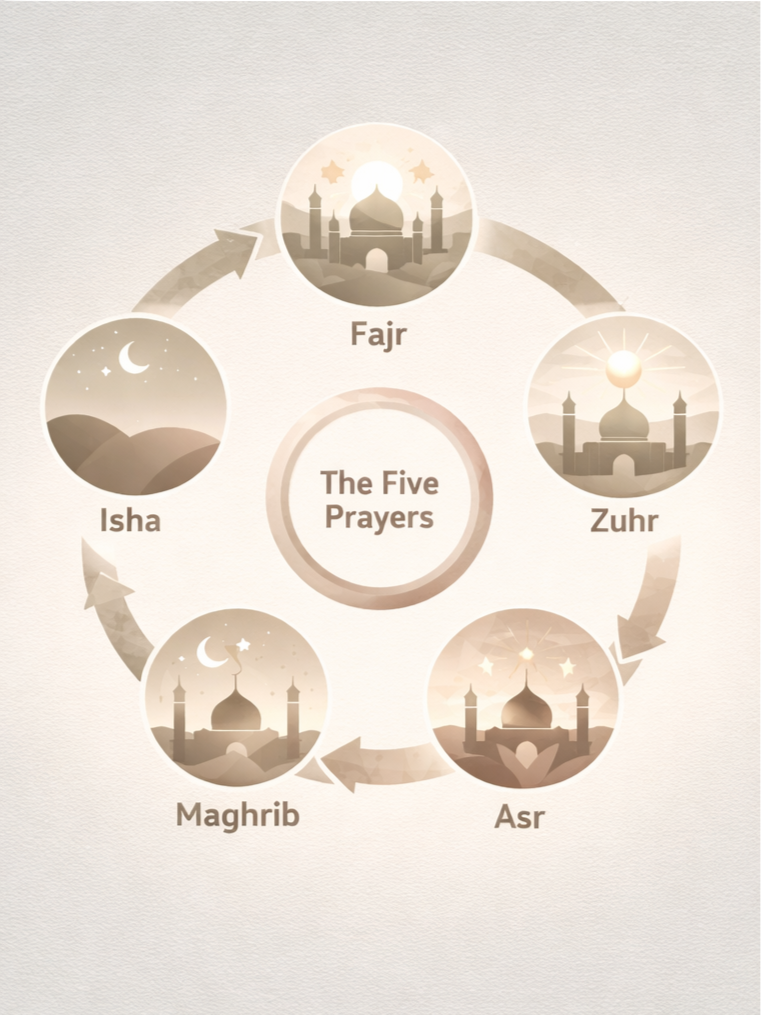
From niyyah to consistent action.

Who is Deen & Dunya for?
For people trying to live intentionally while balancing work, salah, family, energy, and iman — without pretending they have unlimited time or motivation.What does it do?
Deen & Dunya helps you build a personal system around the natural anchors of your day: your prayers. Instead of vague goals, you plan your effort into the real-time gaps you actually have—between salah, meetings, and responsibilities.What insight does it give you?
Over time, Deen & Dunya helps you honestly answer:
- Am I honoring my niyyah with consistent action?
- Am I consistently under-hitting my weekly commitments?
- Am I overestimating my capacity?
- Which time windows actually work for me?No guilt. No streaks. Just clarity.What Deen & Dunya is notNot a motivation app:
It won’t hype you up or send guilt-driven reminders. It helps you see what you’re actually doing with the time you have.Not a streak tracker:
Missing a day doesn’t mean you’ve “failed.” Life shifts—so you plan around it.Not a productivity hack:
This isn’t about doing more. It’s about being honest with your capacity and consistent with what matters.Not a replacement for intention:
Deen & Dunya doesn’t create intention for you. It helps you see whether your actions are aligned with it.Not disconnected from real life:
Plans live between prayers and move as prayer times change—because your day already has structure.
About Us
We solve real-world problems through modern technology and thoughtful design. Deen & Dunya is a productivity app currently in development, created to help Muslims structure their day around daily prayers. The initial release is planned for iOS.
Contact
Privacy Policy
Last updated: November 26, 2026DeenLabs LLC (“we”, “our”, or “us”) operates Deen & Dunya. This policy explains what information the app uses, where it is stored, and the choices available to you.Information You Choose to ProvideYou can use the app without creating an account. Your information is stored on your device. If you create an account and enable cloud syncing, supported information is also stored on our servers and kept up to date across your signed-in devices.Depending on what you use, this information includes:• Account and profile details.
• Events, tasks, reminders, goals, and progress.
• Prayer and fasting records and activity from the Islamic Guide.
• Menstrual or prayer-exemption history.
• Charity records and information entered for zakat calculations.
• Calendar events you import and workout information you save with events.You choose which information to record. For example, you do not need to provide menstrual history, charity information, or access to your calendar or workouts to use unrelated parts of the app.When you create an account or use a subscription, we and our service providers also use account and device identifiers and purchase records to sign you in, restore purchases, and provide access to paid features.LocationYou can allow the app to use your device’s location or choose a city manually. This information supports prayer times and the Qibla compass.Location information and preferences are saved on your device. We use Geoapify to look up place names from coordinates and return city-search results. Coordinates are sent to Geoapify when looking up a place name, and your search text is sent when you search for a city.You can change location permissions in your iPhone’s Settings or choose a city in the app.Cloud Storage and SyncingCloud syncing is optional and available with Premium. Before enabling it, the app explains what will be uploaded and asks for your agreement.When enabled, supported information listed above is stored on our servers and synchronized across your signed-in devices. Changes and deletions to those records also synchronize.Turning syncing off stops future syncing. It does not remove information already uploaded. Signing out or deleting the app does not delete your account or information stored on our servers.Connecting Your CalendarIf you connect Apple Calendar and allow access, the app reads events from the calendars you select. This can include event titles, dates, times, notes, and locations.Imported events are saved in the app and can be stored on our servers when cloud syncing is enabled.Connecting Apple HealthIf you connect Apple Health and allow access to workouts, the app reads recent workout information, including the type of exercise, when it took place, its duration, and the app or device that recorded it.Detailed workout records stay on your device. If you use workouts to track progress toward an event, the credited time and its source are saved with that event and can be stored on our servers when cloud syncing is enabled.Automatic workout tracking is off until you enable it. The app does not add or change information in Apple Health.Disconnecting Apple Health in the app removes its cached workout records for that profile. It preserves workout information already saved with events. You can manage permission to read workouts in Apple Health.Alarms, Reminders, and NotificationsThe app uses your iPhone’s permissions to schedule alarms, reminders, and notifications. Your iPhone handles their delivery.The records used to schedule them are saved in the app and can be stored on our servers when cloud syncing is enabled.How We Use InformationWe use information to provide the features you choose, including:• Signing you in and keeping your information synchronized.
• Calculating prayer times and providing the Qibla compass.
• Displaying calendar events and workouts you allow the app to access.
• Tracking the activity and progress you record.
• Scheduling alarms, reminders, and notifications.
• Managing subscriptions and restoring purchases.
• Responding when you contact support.Companies That Help Us Provide the AppWe use:• DigitalOcean to run our servers and store cloud data.
• Geoapify to provide city searches and look up place names.
• RevenueCat to manage subscriptions, restore purchases, determine access to paid features, and report subscription activity.
• Stripe to process payments for users in the United States.
• Apple to process payments for users outside the United States through the App Store.We do not store full payment-card details. We receive the purchase and subscription information needed to provide paid access.These companies handle information under their applicable terms and privacy policies. Information may be processed outside your country.Selling and Sharing InformationWe do not sell personal information or share it for marketing or advertising.We provide information to the companies listed above as needed to operate the app. Information may also be disclosed when you choose to share it or when required by law.Your ChoicesYou can edit or remove records using the app’s available controls, turn off cloud syncing, disconnect your calendar or Apple Health, and change reminder preferences.You can manage permissions in your iPhone’s Settings and Apple Health.Changing a permission does not automatically remove information already imported or saved. Turning off cloud syncing does not remove information already stored on our servers.Children’s PrivacyThe app is intended for a general audience and is not directed at children under 13. We do not knowingly collect personal information from children under 13.Changes to This PolicyWe may update this policy as the app changes. Updates will appear on this page with a revised “Last updated” date.Privacy ContactFor privacy questions, contact [email protected].This is also our contact address for privacy matters under New Zealand’s Privacy Act 2020.
Terms of Service
Last updated: November 26, 2026These Terms of Service (“Terms”) govern your use of Deen & Dunya, operated by DeenLabs LLC (“we”, “our”, or “us”). By using the app, you agree to these Terms.The ServiceDeen & Dunya is a personal productivity app that helps you plan your schedule around daily prayers, organize activities, and track progress.The app offers free features and additional features through a Premium subscription. Available features and plan limits are described in the app.EligibilityThe app is intended for a general audience and is not directed at children under 13. You must be legally permitted to use the app and enter into these Terms.AccountsYou can use the app without creating an account. An account is required to purchase Premium and use account-based features, including cloud syncing.You are responsible for providing accurate account information, keeping your sign-in details secure, and using an account that belongs to you.Your ContentYour content remains yours. How we handle your information is explained in our Privacy Policy.Cloud Syncing and Connected AppsCloud syncing is optional. When enabled, supported information is stored on our servers and synchronized across your signed-in devices. Turning syncing off stops future syncing but does not remove information already uploaded.You can choose to connect Apple Calendar or Apple Health. These connections require the relevant permissions and depend on the availability of those services and the information they make accessible.Signing out, disconnecting an integration, or deleting the app does not itself delete your account or information stored on our servers.Premium SubscriptionsPremium is offered through monthly and yearly subscriptions. The price, billing period, and any applicable offer terms are shown before you purchase.Payments for users in the United States are processed through Stripe. Payments for users outside the United States are processed through Apple’s App Store.Subscriptions renew automatically unless cancelled before the next renewal. The amount payable, including any applicable taxes, is shown during purchase.Premium access is associated with the Deen & Dunya account used for the purchase. Use that account when signing in on another device or restoring access.Managing and Cancelling SubscriptionsYou can open subscription management from your Profile in the app.Subscriptions purchased through Apple are managed through your Apple account. Subscriptions purchased through Stripe are managed through the subscription-management page opened by the app.Cancellation stops future renewals. Premium normally remains available until the end of the paid subscription period, unless a refund or another payment-provider action ends access earlier.Deleting the app or signing out does not cancel your subscription. Cancelling a subscription does not delete your account or stored information.For purchases through the App Store, request refunds through Apple. For payments processed through Stripe, contact [email protected]. Refund eligibility depends on the purchase terms and applicable consumer law.When Premium EndsWhen Premium access ends, paid features stop being available and free-plan limits apply.Existing records are preserved, but some actions, reminders, and integrations may be limited or paused. Cloud syncing also pauses. You can continue using the controls available under the free plan.Acceptable UseYou agree not to:• Use the app for unlawful purposes or infringe someone else’s rights.
• Access another person’s account or information without permission.
• Interfere with the app’s operation, security, or services.
• Bypass subscription restrictions or other access controls.
• Copy, redistribute, or reverse engineer the app.App Content and OwnershipDeenLabs LLC owns the app’s original software, branding, design, and content. Third-party components remain subject to their own licenses.Your use of the app downloaded through the App Store is also subject to Apple’s applicable standard license agreement.Calculations and GuidancePrayer times, Qibla directions, zakat calculations, and other guidance depend on your inputs, selected settings, location information, and calculation methods. They can contain errors or differ from guidance you follow.The app provides organizational tools and general information. It does not replace qualified religious, medical, financial, or legal advice.Availability and ChangesWe may update the app, change features or plan limits, or discontinue parts of the service. We will provide reasonable notice of material changes affecting paid access, except where urgent security, legal, or operational circumstances require earlier action.We do not guarantee uninterrupted availability or that every feature will work on every device. Alarms, notifications, calendar access, and workout access depend in part on your device, permissions, and operating-system behavior.Suspension and TerminationYou can stop using the app at any time.We may restrict or suspend access where reasonably necessary to address a material breach of these Terms, unauthorized access, security risks, or legal requirements. Where practicable, we will explain the reason and give you an opportunity to resolve the issue.Stopping use or having access suspended does not itself cancel a subscription. Subscription cancellation is handled as described above.Disclaimers and LiabilityThe app is provided “as is” and “as available,” to the extent permitted by law.To the extent permitted by law, DeenLabs LLC is not liable for indirect or consequential losses arising from use of, or inability to use, the app.These provisions do not exclude consumer guarantees or liability that cannot legally be excluded.Governing LawThese Terms are governed by the laws of the State of Wyoming, United States. Mandatory consumer protections that apply where you live continue to apply.Changes to These TermsUpdated Terms will be posted here with a revised date. We will notify you of changes and obtain your agreement where required by law.ContactFor questions about these Terms, contact [email protected].
Washington Consumer Health Data Privacy PolicyLast updated: November 26, 2026DeenLabs LLC operates Deen & Dunya. This policy explains how we handle consumer health data under Washington’s My Health My Data Act. It applies to Washington residents and other people whose consumer health data is collected in Washington.Health Information You Choose to ProvideDepending on the features you use, the app processes:• Menstrual or prayer-exemption history, including the reason and recorded start and end of an exemption.
• Workout information from Apple Health, including exercise type, dates, duration, and the app or device that recorded it.
• Workout time credited toward your events and information identifying its source.
• Other health information you choose to enter in events, notes, or calendar records you import.These records can be associated with your account when cloud syncing is enabled.Where This Information Comes FromHealth information comes from information you record in the app, workouts you allow the app to read from Apple Health, and selected calendar events you import from Apple Calendar.How We Use ItThe app uses this information to:• Apply recorded prayer exemptions to your prayer schedule and tracking.
• Display recent workouts.
• Credit workout time toward selected events and track progress.
• Store and display information you enter or import.
• Synchronize supported records across your signed-in devices when you enable cloud syncing.Device and Cloud StorageThe app stores these records on your device. If you enable cloud syncing, supported records are also uploaded to our servers.Uploaded information includes recorded menstrual or prayer-exemption history, workout information saved with events, and health information contained in other supported records.Detailed workout records read from Apple Health stay on your device. Credited workout time and its source are saved with events and can synchronize.Service Providers and SharingWe use DigitalOcean to host our servers and store synchronized health information on our behalf.We do not sell consumer health data or share it for marketing or advertising. We do not share it with affiliates or other companies for their own use.Your ChoicesYou choose whether to record menstrual or prayer-exemption history, connect Apple Health or Apple Calendar, and enable cloud syncing.You can disconnect integrations in the app and manage their permissions through iOS Settings or Apple Health.Disconnecting Apple Health removes its cached workout records for that profile. It preserves workout information already saved with events.Turning cloud syncing off stops future syncing but does not remove information already uploaded. Changing permissions does not automatically remove information already imported or saved.Access and DeletionFor access to or deletion of health information stored by us, or to withdraw consent to our processing of it, email [email protected].ContactFor privacy questions, contact [email protected].